If you and/or another team member have the incorrect profile photo, please follow the instructions below:
1. Check Vault Profile:
Insights profile photos are matched by the email in Vault. This email can be found under
Settings/My Settings > User Management > Access the profile you would like to check
1a.
[1] is the email that Insights Profile Photos matches with
[2] is where you can update the Profile Photo of the user
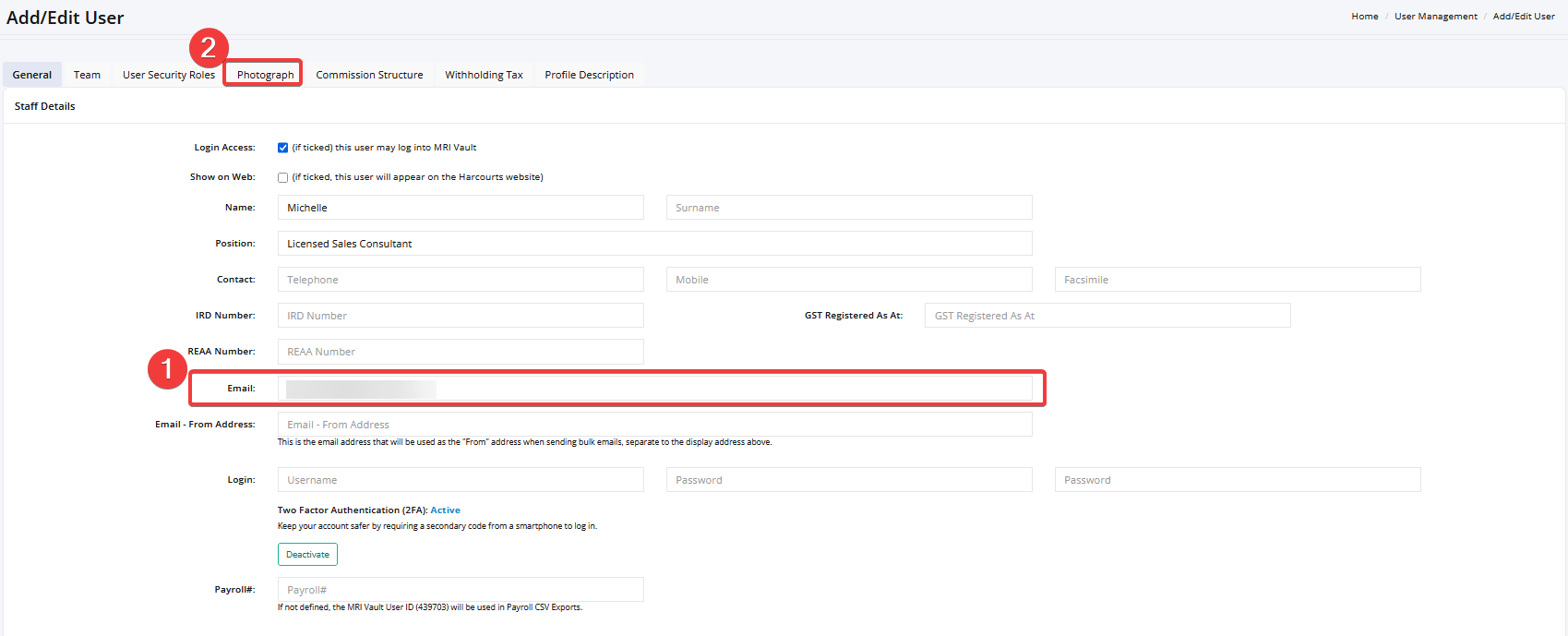
Please ensure after any changes you click the 'Save/Update' button on the bottom right corner - please allow up-to 24 hours for the updates to push through.

2. Insights Profile still not updating:
If your profile photo is not updated - it is possible that another user has the same email you have in their Vault Profile. This can be happen if the email is an office or shared email and is used by multiple people across offices/franchises.
To resolve this - check the offices you have access to and ensure the email in your profile is the same as the other offices you have access to. Also ensure no one in that office is using the same email as you are with a different profile photo.
To prevent this - ensure your email remains consistent (the same) across the offices you have access to on Vault
Was this article helpful?
That’s Great!
Thank you for your feedback
Sorry! We couldn't be helpful
Thank you for your feedback
Feedback sent
We appreciate your effort and will try to fix the article