Promoted vs non promoted User
Promoted user can see all properties for the office (like Full access user in Vault).
Non-promoted users have less listings on their dashboard as they can only access their listings.
Who can Promote users?
Promoted user can promote others in their office.
You can reach out to Helpdesk to promote users but we would need Business Owner's approval.
How to Promote a user?
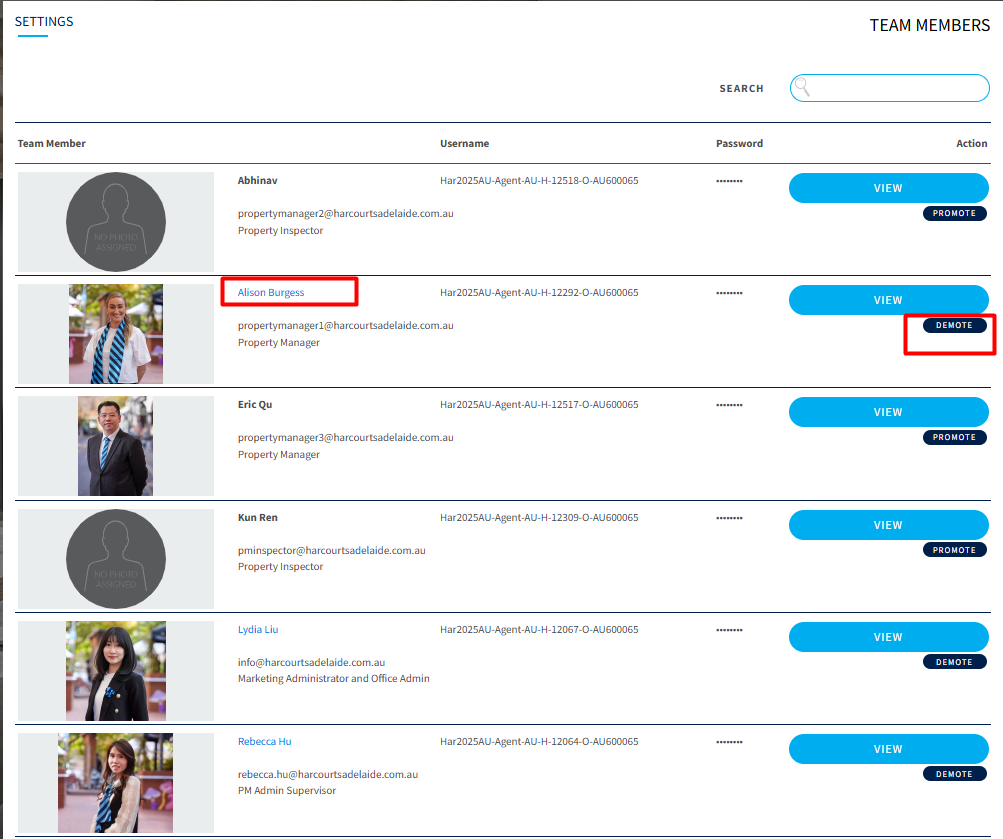
Promoting a user is straight forward. Simply look for the user in Team Members section and hit promote.

How to identify a Promoted User?
Promoted user is easy to identify. They have Cyan text color against their name and have a Demote option next to their profile. See below:
Was this article helpful?
That’s Great!
Thank you for your feedback
Sorry! We couldn't be helpful
Thank you for your feedback
Feedback sent
We appreciate your effort and will try to fix the article